Registration Form
Build and embed the registration and checkout form attendees use to buy tickets.
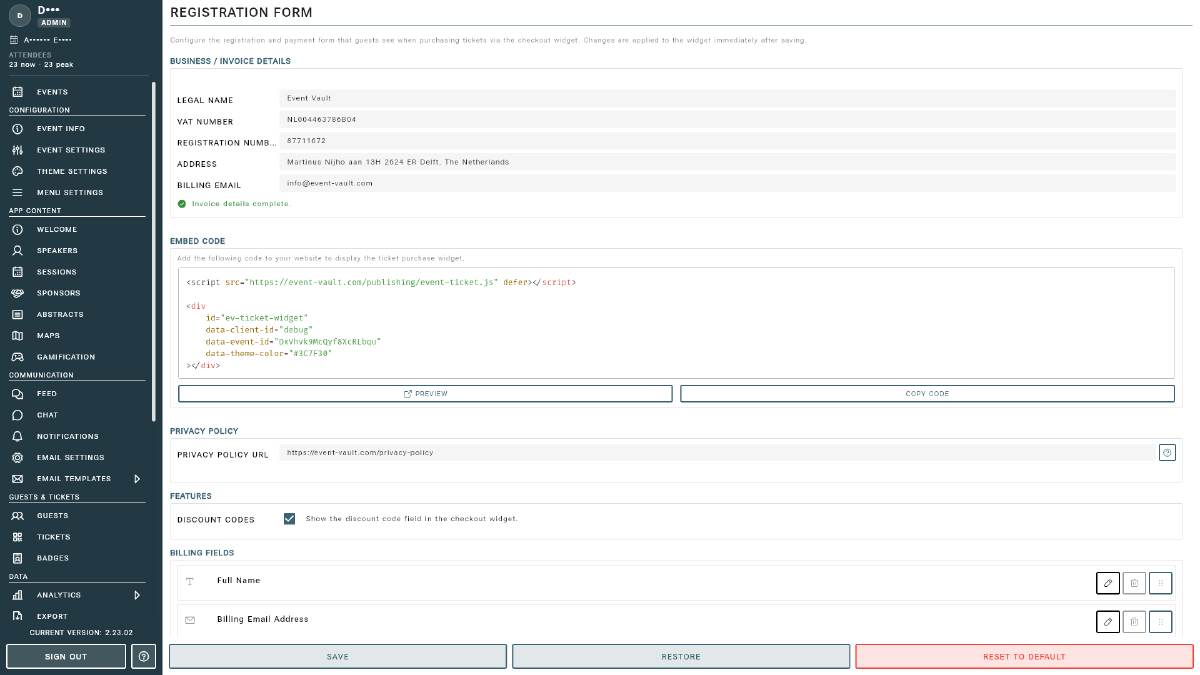
The Registration Form is the checkout your attendees use to buy tickets and register for your event. You can control which billing fields are collected, enable features like discount codes, add your privacy policy, and embed the form on your own website. Open it from Registration Form under the Sales section of the Management Console sidebar.
Billing Fields
The Billing Fields section defines the information collected from each buyer at checkout. Click ADD BILLING FIELD to add one, or select an existing field to edit it. Each field has:
- Key: a unique identifier with no spaces (e.g.
job_title). Used internally and in exports. - Label: the visible label shown to the guest.
- Type: the kind of input (text, and other supported field types).
- Required: when enabled, the guest must fill in this field before they can proceed.
Features
Toggle optional checkout features on or off:
- Discount Codes: when enabled, attendees can enter a promotion code at checkout. Create the codes on the Products page.
Privacy Policy
Enter your Privacy Policy URL (e.g. https://yoursite.com/privacy-policy) so attendees can review how their data is handled before completing a purchase.
Embedding the Form
The Embed Code section provides a snippet you can paste into your own website to host the registration form directly on your domain. Copy it and add it wherever you want attendees to register.
Saving Changes
- SAVE: apply your changes and make them live.
- RESTORE: discard unsaved changes and revert to the last saved version.
- RESET TO DEFAULT: return the form to Event Vault’s default configuration. This replaces your current fields, so use it with care.