Products: Tickets & Add-ons
Create paid tickets, add-ons, and promotion codes with per-product tax settings.
The Products page is where you build everything attendees can buy: paid tickets, optional add-ons, and promotion codes. Open it from Products under the Sales section of the Management Console sidebar.
Products are grouped into three lists:
- Tickets: the paid admission or session tickets attendees purchase.
- Add-ons: optional extras that can be bought alongside a ticket (e.g. a workshop, a dinner, merchandise).
- Promotion Codes: discount codes that reduce the price at checkout.
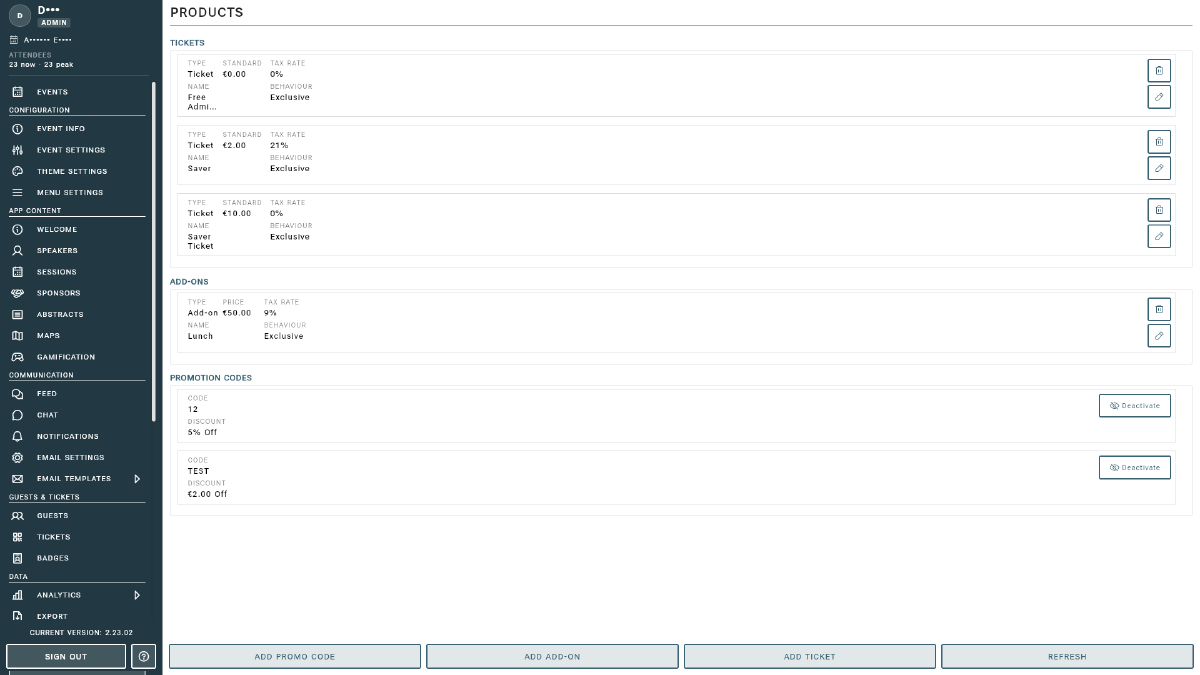
Creating a Ticket
- Go to Products and click ADD TICKET in the action bar.
- Fill in the ticket details: name, description, price, and available quantity.
- Configure the ticket’s Tax Settings (see below).
- Save. The ticket appears in the Tickets list and becomes available on your registration form.
A completed purchase automatically grants the buyer the matching in-app access, so you don’t need to assign access tickets manually. See Access tickets vs. paid products for how the two relate.
Adding Add-ons
Click ADD ADD-ON to create an optional extra. Add-ons are priced and taxed just like tickets and are offered to attendees during checkout.
Promotion Codes
Click ADD PROMO CODE to create a discount code. Promotion codes must be enabled on your registration form for attendees to enter them at checkout. See Registration Form.
Tax Settings
Tax is configured per product: you set it directly on each ticket or add-on, not automatically from the buyer’s location. When creating or editing a product, set two values:
- Tax Rate (%): the tax percentage to apply. Set it to 0 for tax-exempt products.
- Tax Behavior: how the rate relates to the listed price:
- Exclusive: tax is added on top of the listed price (e.g. €10 + 21% = €12.10 charged).
- Inclusive: tax is already included in the listed price (e.g. €10 already includes 21% tax).
Why tax is handled per product
This is Event Vault’s own tax handling layered on top of Stripe. We use explicit per-product rates rather than Stripe Tax’s automatic, location-based calculation. It keeps tax simple and consistent:
- Less complexity. You set one clear rate per product instead of maintaining per-country tax configurations.
- No silent failures. With automatic per-country tax, a single misconfiguration can mean no tax is charged at all. An explicit rate always applies exactly what you entered.
- Fits in-person events. Physical event tickets are usually taxed in the country where the event is held, so a single host-country rate per product is both accurate and easy to manage.
Every guest is charged exactly the rate you set.
Refreshing the List
Click REFRESH to reload products after making changes elsewhere. If you haven’t created anything yet, the page shows “No products found. Click ADD to create tickets or add-ons.”