Documentation
Financial Report
Review revenue, refunds, Stripe fees, and estimated payouts, and export to Excel.
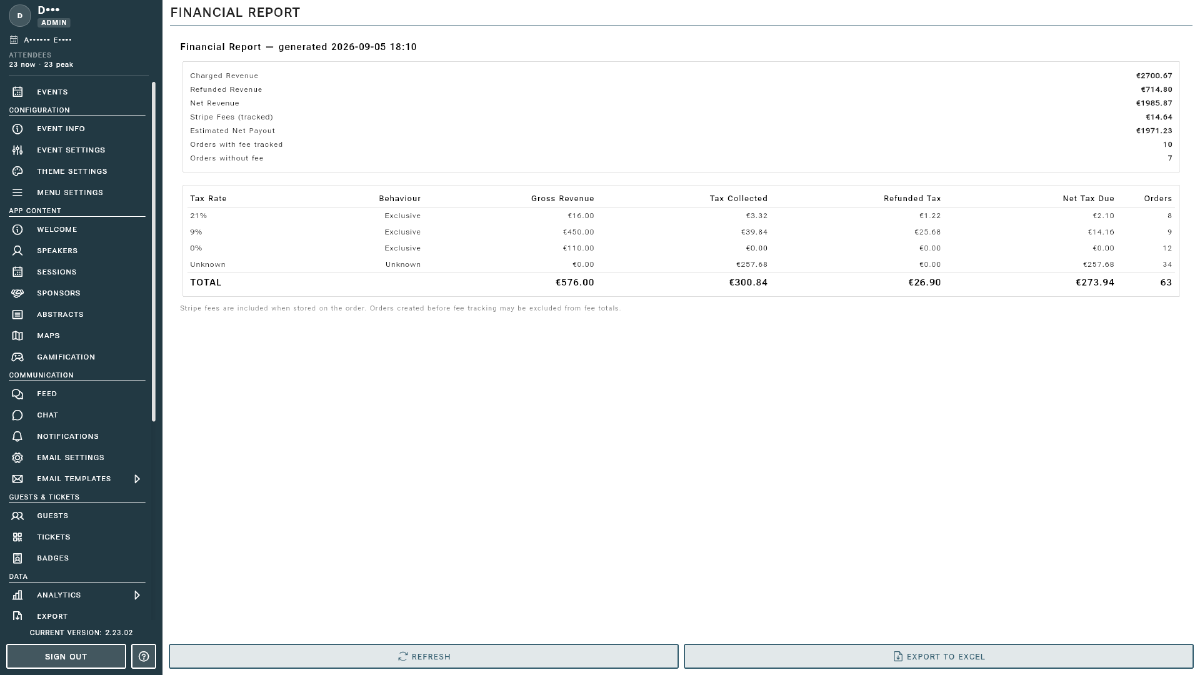
The Financial Report gives you a live summary of your event’s sales performance: revenue, refunds, fees, and what you can expect to be paid out. Open it from Financial Report under the Sales section of the Management Console sidebar. Figures are grouped by currency, with a combined TOTAL row.
Key Figures
- Charged Revenue: the gross amount charged to buyers.
- Refunded Revenue: the total value refunded to buyers.
- Net Revenue: charged revenue minus refunds.
- Stripe Fees (tracked): the Stripe processing fees recorded against your orders.
- Estimated Net Payout: an estimate of what will land in your bank account after fees and refunds.
Fee Tracking Coverage
Two counters show how complete the fee data is:
- Orders with fee tracked: orders where the exact Stripe fee is known.
- Orders without fee: orders where the fee could not be recorded, so it is estimated.
Because some fees are estimated, treat Estimated Net Payout as a close approximation rather than an exact figure. The authoritative payout amounts always come from Stripe. See Payouts and Balances.
Tip
Click REFRESH to pull the latest orders into the report. Click EXPORT TO EXCEL to download the full breakdown for your accounting or bookkeeping.