Welcome Screen Customization
How to customize your event's welcome screen with dynamic content.
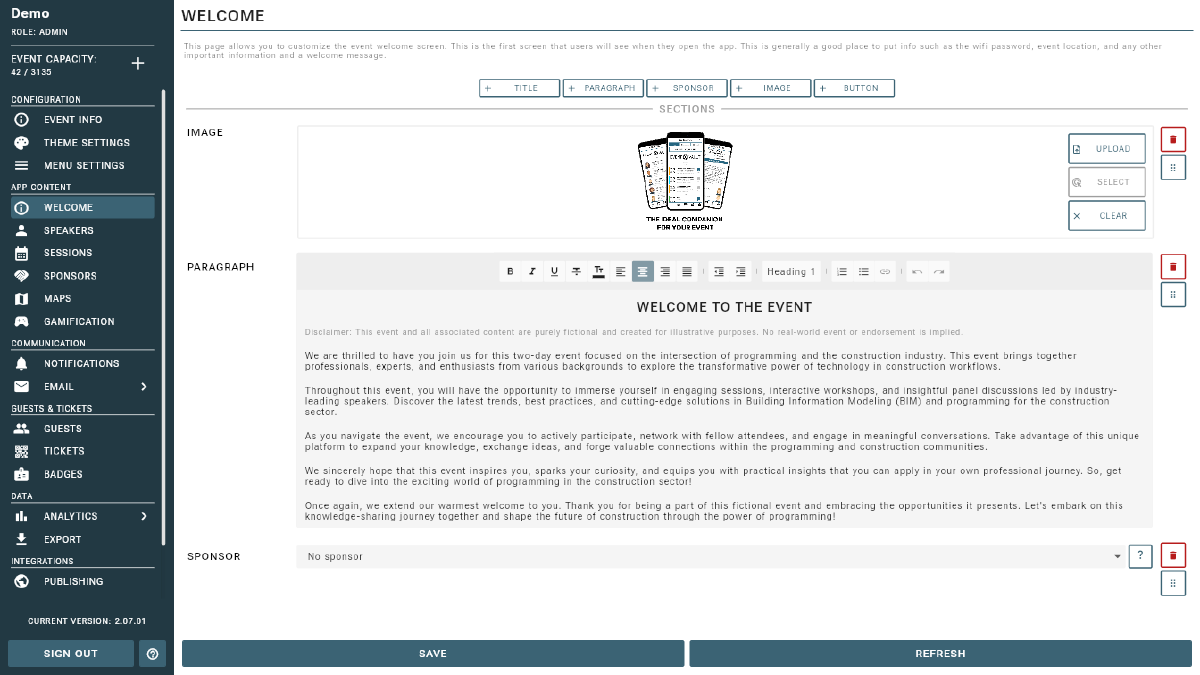
The Event Vault welcome screen is the first thing your attendees see in the app. You can fully customize this screen to match your event’s branding and goals using the built-in content builder.
What Can You Add?
You can mix and match the following content block types:
- Title — a prominent heading to introduce your event or highlight key information.
- Paragraph — descriptive text, welcome messages, or instructions for attendees.
- Image — banners, event graphics, or any image to enhance the visual appeal.
- Sponsor Banner — showcase sponsor logos and links to give your partners visibility on the welcome screen.
- Custom Section — a flexible block for adding custom rich content or embedded elements.
How It Works
- Add content blocks using the content builder in the Welcome Screen section of the Management Console.
- Drag and drop blocks to arrange them in any order.
- Each block can be edited, moved, or removed at any time.
- Preview changes in the app before publishing.
Tip
The welcome screen is a great place to highlight important event details, promote sponsors, and guide attendees to key features.
Tips
- Use a clear, welcoming title and a brief paragraph introducing the event.
- Add your event banner image near the top for immediate visual impact.
- Showcase your headline sponsors with a Sponsor Banner block.
- Keep text concise — attendees will view this on mobile devices.
- Optimize images for mobile viewing to ensure fast load times.