Gamification: Treasure Hunt & Marker System
How to create interactive QR hunt games and boost engagement with Event Vault's gamification features.
Event Vault includes a gamification system that turns your venue into an interactive treasure hunt. Attendees scan QR markers to earn points, compete on a live leaderboard, and stay engaged throughout your event.
Setting Up the Treasure Hunt
- Go to the Gamification section in the Management Console.
- Click CREATE MARKER to add a new QR marker.
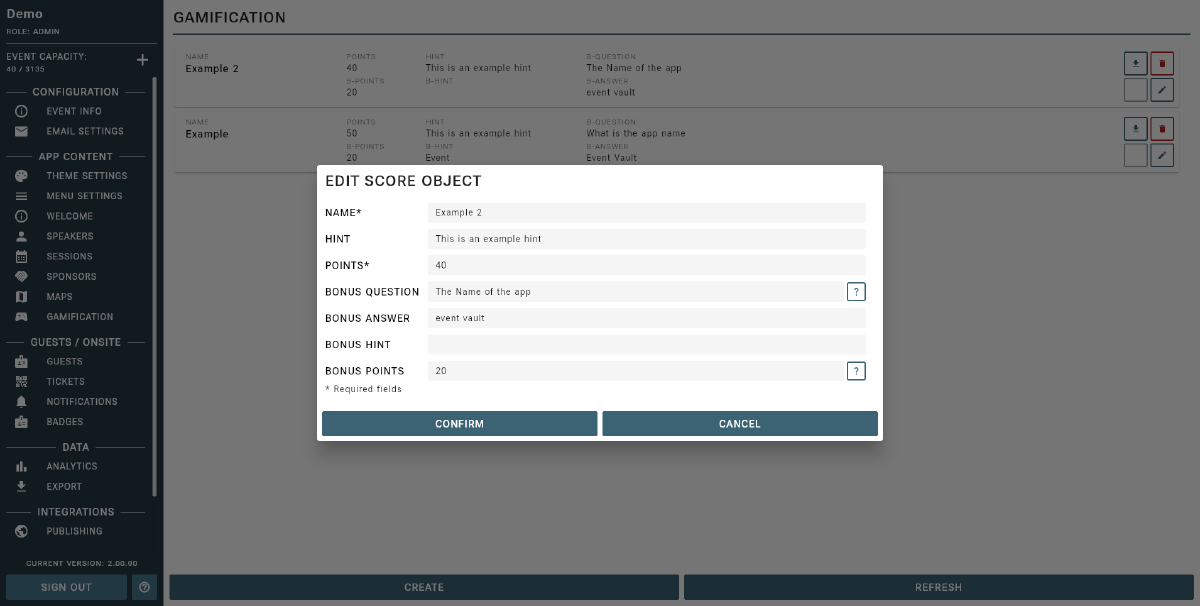
- For each marker, enter:
- A name/label to identify the marker (e.g., “Booth A”, “Main Stage”).
- The number of points awarded for scanning it.
- An optional bonus question that attendees must answer to earn extra points.
- Optional hints that attendees can view in the app to help find the marker.
- Once saved, download or print the QR code for each marker and place it at the corresponding location at your venue.
- Attendees scan QR codes using the Leaderboard Scanner menu item in the companion app to earn points.
Question Types
- Open Questions: Attendees type in their answer freely.
- Multiple Choice Questions:
- To create a multiple choice question, write your question as normal and add the answer options within square brackets, separated by commas.
- Example:
What is the capital of France? [Paris, London, Berlin, Rome] - The app will auto-detect this format and display it as a multiple-choice answer.
Leaderboard & Competition
- The results of the hunt are shown via a live leaderboard in the app.
- The leaderboard updates in real time as attendees scan markers.
- You can display the leaderboard on a screen at your event using the app’s Leaderboard view to encourage competition and motivate participation.
Tip
Use creative questions, hints, and bonus challenges to make your treasure hunt more exciting! The leaderboard can be displayed on screens at your event for extra motivation.
Tips
- Place markers in interesting or high-traffic locations to maximize participation.
- Mix open and multiple choice questions for variety.
- Assign more points to harder questions or markers in less obvious locations.
- Add helpful hints to make the hunt fun and accessible for all attendees.